No Image Available Amazon and How to Fix It
Fix no image available Amazon by restoring a compliant MAIN image, then restart PPC only after search and the detail page are live.


Raising bids won't fix a No Image Available Amazon listing. It'll usually make the diagnosis worse. When Amazon has no compliant MAIN image to show, the product can disappear from customer view, so falling impressions, clicks, and conversion look like a media problem when the page itself isn't shoppable.
Treat the blank thumbnail as a retail-readiness gate, not a design issue. Restore a compliant primary image first, verify it's live in search and on the detail page, and only then judge whether your keywords, bids, and budgets are working.
Main Image Rules That End the Blank Thumbnail
No image available isn't a styling choice Amazon accepts. It's a compliance block. Shoppers may see a blank thumbnail, a gray box, or that phrase in search results, on the detail page, or on one variation inside an otherwise healthy family.
Amazon's product image policy requires every ASIN to have at least one compliant main image, identified by the MAIN variant code, and that image appears in search results and on the product detail page. You can't delete the main slot to clear the error. You must replace it with a file that passes review.
Why This Costs You Before Ads Enter the Picture
The commercial sequence is simple and brutal. Amazon suppresses or limits a listing without an acceptable primary image, organic impressions fall, and shoppers who do reach the page can't evaluate the product. Your team then sees weak click-through rate and conversion rate and starts cutting keywords or raising bids.
Both moves misread the problem. The keyword didn't suddenly lose relevance. The listing lost its visual identity. Placeholders don't solve it either, because Amazon prohibits them and the first uploaded image can establish product identity and interfere with later image selection.
Don't troubleshoot media efficiency on a page Amazon may not be showing to customers.
Technical quality matters at the same gate. Amazon's image standards accept files between 500 and 10,000 pixels on the longest side and recommend images larger than 1,000 pixels to enable zoom. A file can exist and still be too small to let shoppers inspect materials, controls, stitching, ports, or other details that drive the purchase.
Score the Current File Before You Touch a Campaign
Use this table as a pass or fail checklist. If the current MAIN file fails one row, replace it. Don't upload a lifestyle set around a broken primary image and call that progress.
| Requirement | Spec | Why it matters |
|---|---|---|
| Background | Pure white, RGB 255, 255, 255 | Required for most main images |
| Product in frame | About 85 percent, entire item, no crop | Thumbnail must identify the real product |
| Units shown | One unit, realistic professional photo | Multiple units or graphics can fail review |
| Longest side | 500 to 10,000 pixels; over 1,000 for zoom | Below 1,000 pixels blocks useful zoom |
| File type | JPEG preferred | TIFF, PNG, and non-animated GIF also accepted |
| Image count | At least one MAIN image | Up to 9 images allowed on the listing |
| Placeholder | Not permitted | First file can define product identity |
The image count ceiling is worth noting for planning the full set later. Amazon allows up to 9 images per product listing, according to EcomBrainly's 2025 to 2026 Amazon seller statistics report. That's room to explain the offer, but only the compliant MAIN file restores basic visibility.
If your team needs to produce compliant variants, backgrounds, and supporting visuals without turning every fix into a reshoot, tools that organize creative assets for marketing teams can help you prepare files before upload. The asset still has to depict the physical unit accurately. No tool gives you an exemption from the white background, framing, or single-unit rules.
Close this step with a blunt scorecard. Open the current MAIN file, check background values, crop, unit count, pixel dimensions, and file type, and mark each row pass or fail. If anything fails, your next action is replacement, not a campaign change.
How to Replace the Main Image
Work the replacement in seller order, not creative order. Your goal isn't a prettier gallery. It's a live, customer-visible MAIN thumbnail attached to the exact SKU and marketplace that lost visibility.
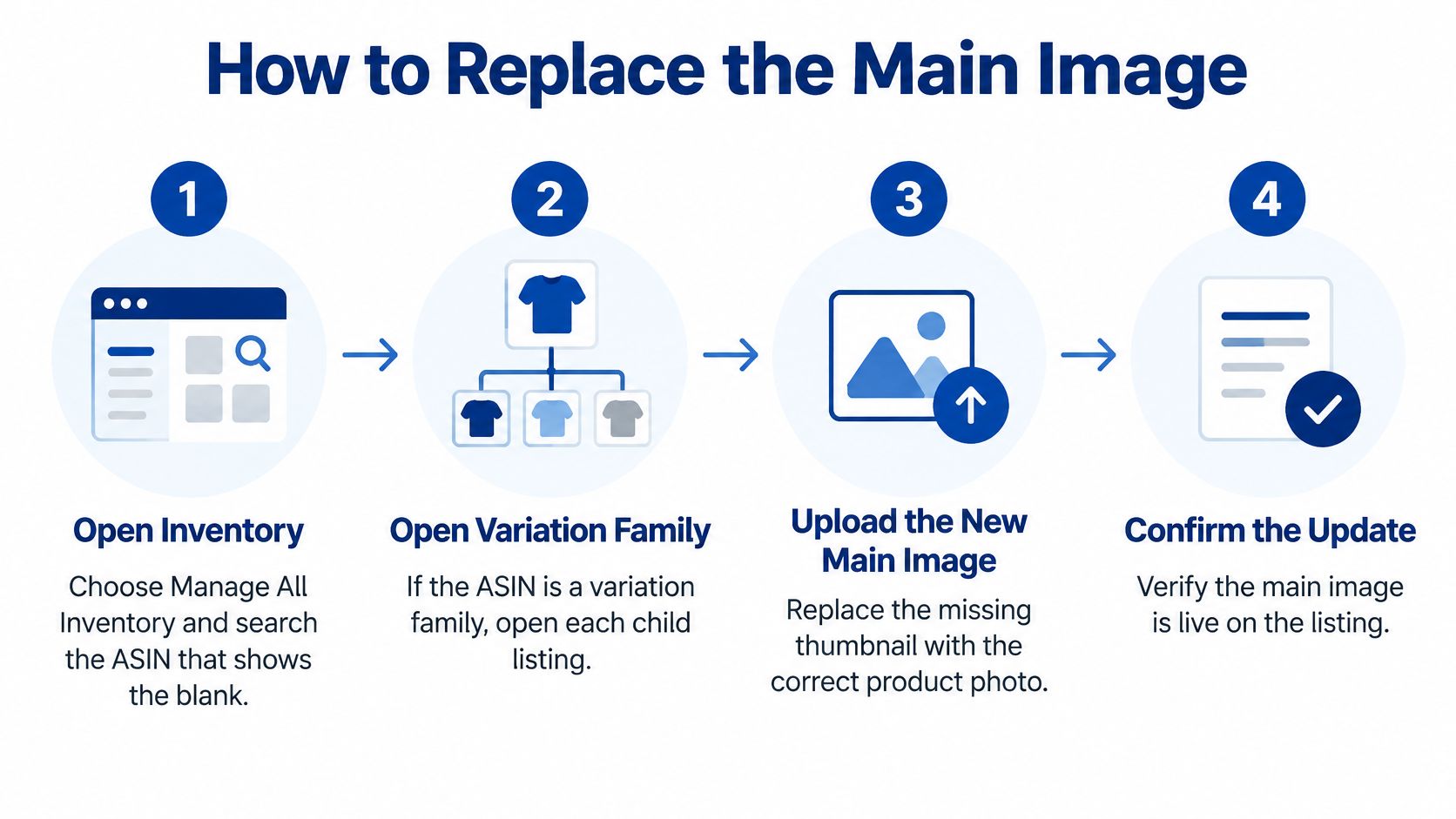
The Replacement Sequence in Seller Central
Follow these steps in order and don't skip the variation check. A clean parent page often hides the exact child ASIN your ads are sending traffic to.
- Open Inventory and choose Manage All Inventory: Search the ASIN that shows the blank thumbnail and confirm you're looking at the affected marketplace, not a healthy storefront.
- Open each child SKU in a variation family: If the ASIN has variations, inspect every child, because a healthy parent can hide a child with no MAIN image.
- Select the camera icon under the main thumbnail: Don't try to clear or delete the slot. The MAIN position is mandatory, so replacement is the only useful path.
- Upload one file of the physical unit: Use a realistic image of the exact product being sold, matched to the correct color, size, pack, or model for that child SKU.
- Check file type and pixel size before you submit: Aim for a longest side above the zoom threshold and reject any file that fails the background, crop, or unit rules.
- Attach the file to the correct SKU and marketplace: Save the change and note the submission time so your team doesn't judge performance during processing.
- Allow up to 24 hours before judging the live page: Amazon's image upload guidance states that an image can take up to 24 hours to appear on the website after submission.
- Recheck search and the detail page on desktop and phone: Confirm the thumbnail shoppers see, not just the confirmation inside Seller Central.
- Leave bids and daily budgets unchanged: Don't create a second variable while retail readiness is still unproven.
Two Slips That Waste the Fix
The first slip is marketplace blindness. A team uploads the corrected file in the home marketplace, sees a clean thumbnail, and assumes every storefront recovered. Canada, the UK, or another catalog can still show No Image Available Amazon shoppers a blank result while campaigns there keep spending.
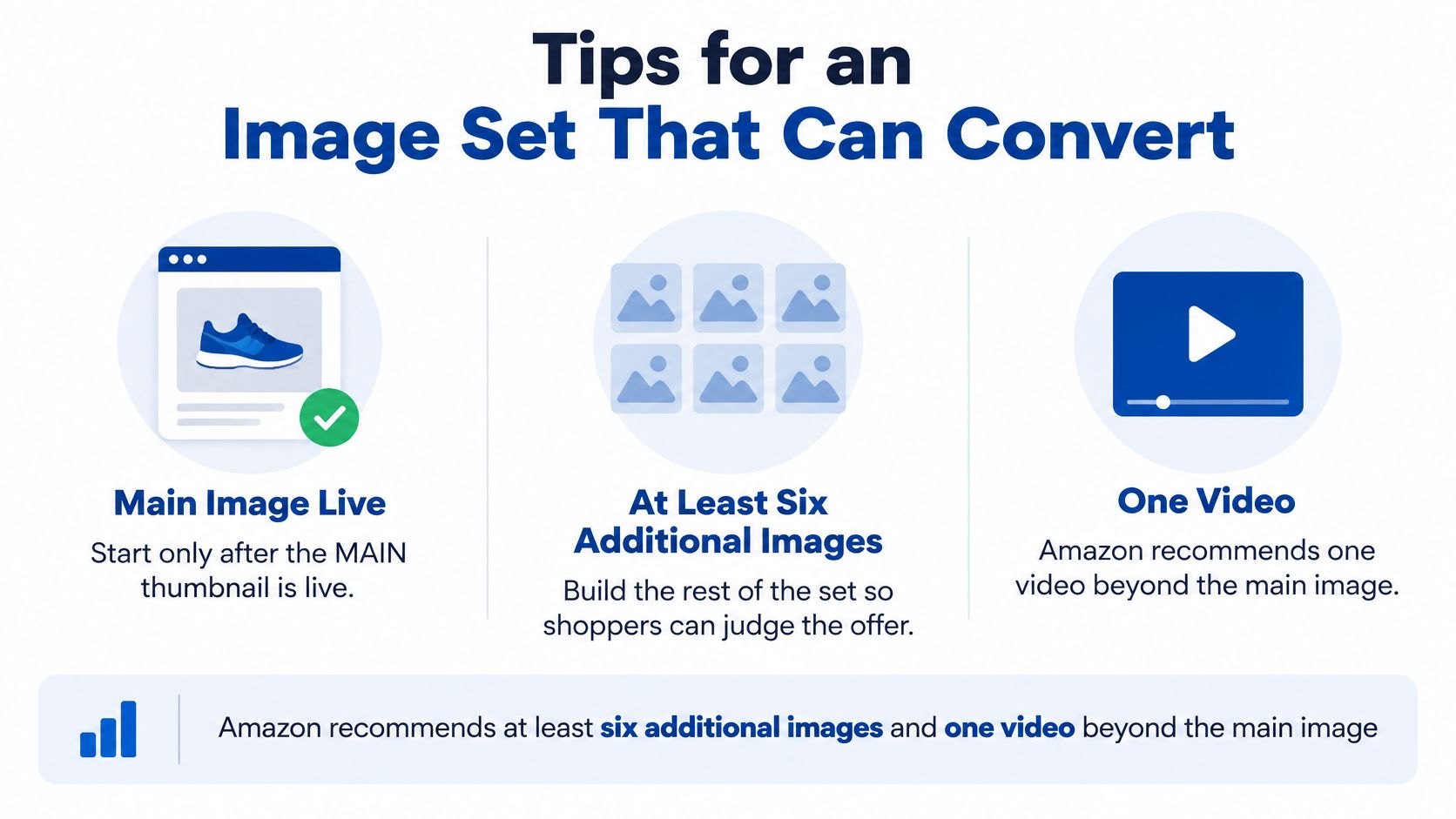
The second slip is building the supporting gallery first. Lifestyle frames, feature callouts, and video help shoppers choose, but they don't rescue a noncompliant MAIN slot. Amazon recommends at least six additional images and one video beyond the required main image, and that recommendation matters after the primary image is live.
Milestone: A customer-visible primary thumbnail in the marketplace where you'll spend. A larger budget isn't a milestone.
Build this into your broader listing hygiene so the same failure doesn't recur on the next launch. A structured review of Amazon product listing optimization helps you connect image status, variation structure, and marketplace coverage before launch traffic starts.
Treat the upload as a timed recovery workstream. Log the ASIN, child SKU, marketplace, file name, dimensions, and submission time. Verify the live result after the processing window. Then, and only then, reopen questions about keywords and bid levels.
Why the Placeholder Is Still Showing
A blank thumbnail after an upload doesn't automatically mean the upload failed. Sometimes you're inside the publishing window. Sometimes the file landed on the wrong child, the wrong marketplace, or a contribution path that doesn't control the live ASIN.
Start with timing. If you submitted a compliant file recently, wait out the processing window and recheck both search and the detail page before uploading again. Repeated uploads during a lag create noise for your team and make it harder to know which file Amazon accepted.
Match the Symptom to One Fix
Amazon's "Image missing" guidance applies specifically to the MAIN image and says Amazon may prevent the product from being displayed to customers when no submitted image meets requirements. It also confirms sellers can't delete the main image and must replace it using the camera icon beneath the main thumbnail.
| Symptom | Likely cause | Fix |
|---|---|---|
| Blank just after a valid upload | Publishing delay | Recheck search and the detail page after the processing window |
| Only one variation is blank | Child ASIN has no MAIN image | Open that child SKU and replace its main file |
| New file never goes live | Background, crop, text, props, or multiple units | Replace with one compliant product-only image |
| Delete does nothing | MAIN slot is mandatory | Use the camera icon and overwrite the file |
| Fine in one country, blank in another | Image is marketplace-specific | Upload the compliant MAIN image in the suppressed marketplace |
| Clicks or conversion drop the same day | Listing is not customer-visible | Hold bid increases until the thumbnail is live |
The variation case deserves special attention. Shoppers often land through a swatch, size, or color selector, and that child needs its own valid MAIN file. If only one swatch is blank, don't rebuild the parent. Open that child SKU and fix the file attached to it.
When the File Looks Fine but Won't Stick
Look for quiet compliance failures. An off-white background from a studio export, a product edge clipped by tight framing, a badge added by a designer, a prop hand, or two units shown to suggest quantity can all keep the file from clearing. Strip the MAIN image back to one realistic unit on pure white.
Brand-registered catalogs add another trap. An image contributed through the wrong contribution path can appear in editing tools and still fail on the live ASIN. Verify the storefront page, not the upload confirmation alone, and confirm the accepted image is attached to the ASIN shoppers can buy.
The ad metric trap is just as important. If Sponsored Products clicks or conversion collapsed on the same day the thumbnail vanished, treat the listing as not customer-visible. Stop raising bids. You're not fixing weak demand, you're paying to test a broken shelf.
Use one decision rule. Make a second upload only after a row in the table matches your symptom and tells you what to change. Uploading the same file again and hoping Amazon changes its mind isn't a strategy.
Tips for an Image Set That Can Convert
A converting gallery starts after the MAIN thumbnail is live. Until that gate clears, deeper images are invisible and PPC readouts stay polluted; once it clears, every secondary slot has one job: answer the next shopper question before doubt costs the click.
Build the Set in Shopper Order
Amazon recommends additional images and video so shoppers can assess use, features, angles, and environment. Plan each slot to answer one question instead of filling the gallery with near duplicates.
- Second angle or back view: Show controls, closures, ports, seams, or construction the front view hides.
- Scale shot: Place the product against a familiar object or hand so size isn't guesswork.
- Feature callout: Highlight the one functional difference shoppers compare, while staying inside secondary image rules.
- Packaging and contents: Show exactly what's included so the offer doesn't create returns.
- In-use frame: Put the product in a real setting that matches the buyer's actual job.
- Short video: Demonstrate the core benefit in motion without replacing the compliant still MAIN image.
Depth pays, but only when each frame adds information. In 2025, listings with 7 or more images converted at 2.4 times the rate of single-image listings, according to Statista's E-commerce Photography Report as cited by Lumepixa. Treat that as a correlation across listings, then measure your own before and after by ASIN.
Shopper expectations point the same way. In 2025, 77% of shoppers rated product images and videos as very or extremely important to completing a purchase, according to Salsify's consumer research as reported by Snappr. Use video as proof of use. Keep the primary still image clean, white, and literal.
For creative direction, Headline's home goods case is the useful pattern: lifestyle images were A/B tested against product-only images and improved click-through rates by 34%. The lesson is not "add lifestyle everywhere." Test the frame that answers the buying question fastest for that ASIN.
Use Production Shortcuts Without Creating a New Risk
AI can shorten production, but the accuracy standard does not move. In 2024, 23% of top-performing Amazon sellers used AI for at least some product imagery, according to Rewarx data cited by Lumepixa. Use it for backgrounds, cleanup, or scene building only when the final frame still shows the actual product, actual proportions, and actual included items.
Audit assets before you rebuild. Treat collect images from Amazon listings as a rights question, not a shortcut: limit any collection to ASINs and files you own or have permission to use, and review competitor listings manually in the storefront instead of bulk-downloading or reusing creative you do not own.
Stronger planning starts at the brief. Our guide to product photography for Amazon helps you specify angles, scale references, packaging contents, and in-use proof before production money is spent. Match every image to its variation so a swatch never advertises the wrong unit.
The standard is measurable creative. Once the full set explains the offer, CTR and conversion rate become useful signals again instead of symptoms of a blank listing.
When Paid Traffic Is Worth Turning On
The instinct to raise bids when traffic falls is expensive during an image outage. You're asking ads to create demand for a listing Amazon may not display properly, then using the resulting data to judge keywords that never got a fair test.
Hold spend until the ASIN passes a restart gate. This is the profitability-first move, even if pausing feels passive to a team under sales pressure.
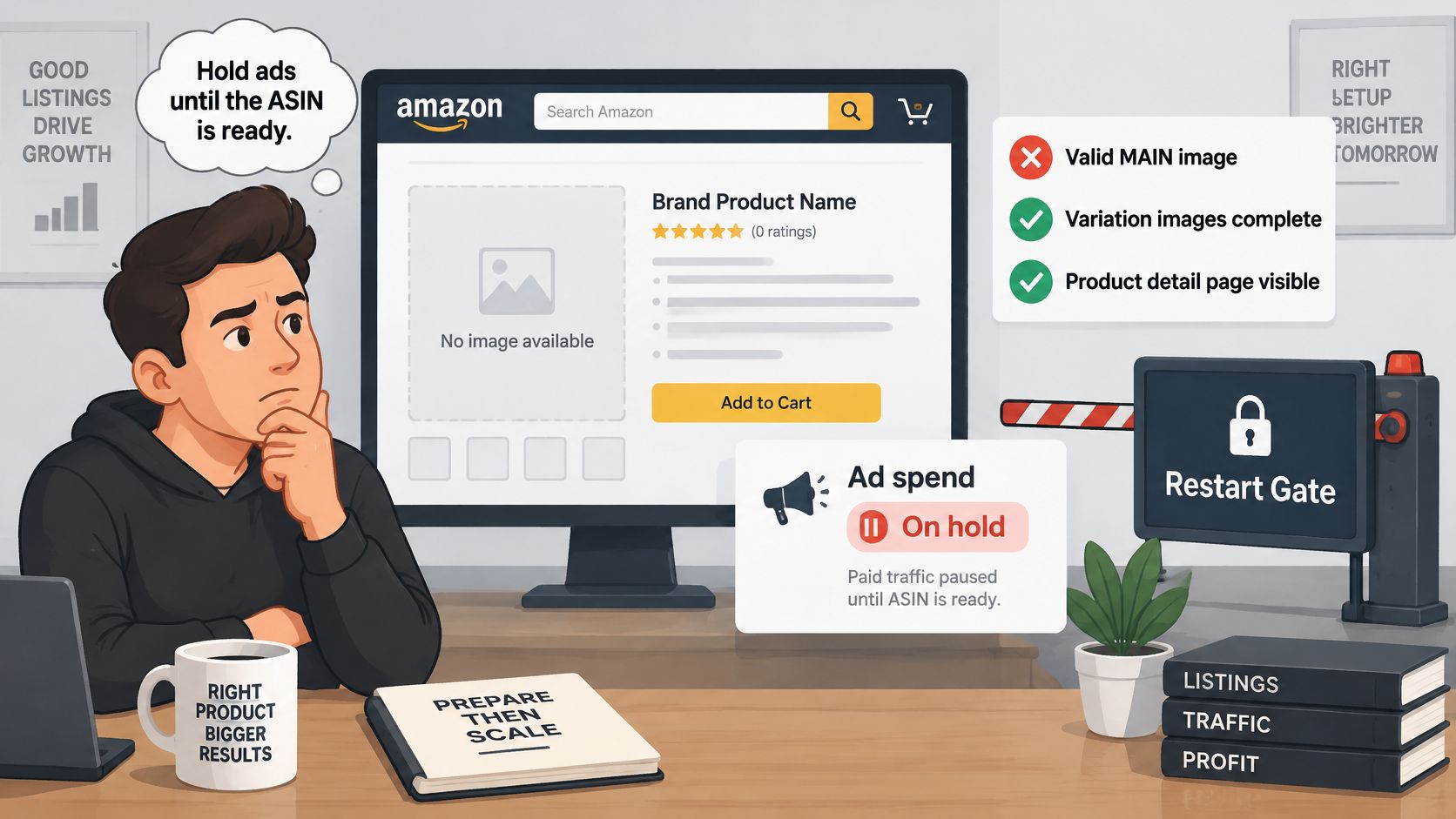
The Four Part Restart Gate
Check these items in order for the exact ASIN and marketplace in the campaign. Don't approve a restart based on a screenshot from Seller Central or a healthy result in another country.
- Valid MAIN image: The ASIN has a compliant primary file attached and accepted.
- Correct child SKU: The SKU your ads point to is the same child that received the replacement.
- Customer-visible proof: Search results and the detail page both show the thumbnail on desktop and mobile.
- Processing window cleared: At least a day has passed since submission, so lag isn't mistaken for a bid problem.
Only after those checks should you read advertising metrics normally. Falling CTR during the blank period isn't evidence the keyword is wrong. Weak conversion during suppression isn't evidence the price, reviews, or targeting suddenly failed.
Content compliance comes before media spend, because discovery is weak until the main image is eligible.
Restart Narrow, Then Let Conversion Earn Expansion
Amazon Advertising's published sequencing example is the right model. In the YourSeller and Rosy Soil case study, the first phase from April through June 2025 concentrated on exact-match Sponsored Products campaigns for cactus and succulent keywords to build organic ranking and review velocity before expanding into broader head terms.
Copy the mechanic, not the category. Restart on tightly controlled, high-intent exact terms that match the restored product and its strongest use case. Generate relevant sales signals, validate conversion on a now-visible page, and widen only after that conversion holds.
Don't use outage-period ACOS as your new baseline. It blends retail failure with media performance and will push you toward bad cuts. Set a clean post-recovery window, compare it with the last healthy period before the thumbnail disappeared, and judge expansion from there.
This discipline is how PPC becomes a lever for organic growth instead of a patch for catalog defects. Relevant paid clicks can support ranking signals when the page converts. Paid clicks sent to a suppressed or visually incomplete page mainly produce misleading diagnostics and wasted spend.
If you're weighing whether the restart deserves budget at all, pressure-test the economics with whether Amazon PPC is worth it before you widen targeting. Broader coverage should be earned by profitable exact-match proof, not granted because the team wants lost volume back quickly.
Scaling adds another risk. Once exact terms recover, budget increases can outrun the listing's ability to convert new queries. Use clear guardrails to keep ad campaigns profitable as you scale, especially when you're rebuilding after lost visibility and your recent baselines are contaminated.
Put One Owner on Creative and the Restart
For brands that want image production and campaign restarts under one owner, we create custom lifestyle imagery, including professional lifestyle photography shoots, and run Amazon PPC as a Certified Amazon advertising partner. In one home goods engagement, A/B tests of lifestyle images against product-only images improved click-through rates by 34%. Run that kind of test only after the white background MAIN image is compliant, because lifestyle proof belongs in the supporting set.
A US recovery doesn't prove the UK or Canadian ASIN can take traffic. Apply the gate marketplace by marketplace, child by child. It takes longer, but it prevents one clean screenshot from authorizing spend across a catalog that still has blank shelves.
End with one decision for one suppressed ASIN. Confirm the live thumbnail, write down whether ads stay paused or restart on exact match only, and name the date you'll review clean data. No broad relaunch. No bid rescue. Retail readiness first, then media.
If a No Image Available Amazon error has contaminated your PPC data, Headline Marketing Agency can connect listing recovery, custom imagery, and a profitability-first campaign restart under one accountable team. Visit us to discuss how we'd verify retail readiness, rebuild exact-match momentum, and turn paid traffic back into a lever for organic growth.
Get Your Free Amazon PPC Audit
Discover untapped growth opportunities and see how our data-driven approach can improve your ROAS.
Get Free Audit →Wollen Sie Ihre Amazon PPC-Performance aufs nächste Level bringen?
Lassen Sie Ihre Amazon PPC-Kampagnen professionell analysieren und entdecken Sie neue Wachstumsmöglichkeiten.