Amazon Video Ad Specs: The Complete 2026 Reference
Master Amazon video ad specs for 2026 across Sponsored Products, Sponsored Brands, DSP, and Streaming TV with dimensions, codecs, and preflight checks.

Amazon video is often treated as a creative format problem. It's really a measurement and compliance problem first. In Amazon's reported Hasbro campaign, Prime Video reached 7 million unique users, while 68% of Peppa Pig purchases came from new-to-brand customers. For Play-Doh, Prime Video reached 7.2 million unique shoppers, including 6.7 million people not reached by the brand's display ads, according to Amazon's Hasbro case study.
That result changes the production question. You're not making one video and uploading it everywhere. You're building a delivery system that protects eligibility, preserves the message without sound, and gives PPC enough reach to support organic growth, profitability, and sustainable scale.
Why Amazon Video Ad Specs Are a Placement Problem
Amazon video ad specs govern four distinct delivery profiles: Sponsored Products, Sponsored Brands, DSP online video, and Streaming TV or Prime Video. Each profile applies different rules to duration, resolution, bitrate, audio behavior, file format, and delivery environment.
A Sponsored Brands file may work in search results yet fail DSP requirements. An edit with a prominent audio track can also require changes for Sponsored Products, where Amazon removes uploaded audio. Placement determines the production brief before the creative team opens its timeline.
Practical rule: Build the campaign profile before you build the edit.
Set the destination and objective first:
- Sponsored Products video supports product-level discovery and must communicate clearly during silent viewing.
- Sponsored Brands video provides a controlled search-results format for product demonstration and brand recognition.
- DSP online video extends reach across Amazon-owned and third-party environments, with separate delivery and tracking requirements.
- Streaming TV and Prime Video call for a more television-oriented production approach, plus destination-specific bitrate requirements.
Amazon's general guidance provides a useful technical baseline: a 1920 × 1080 canvas, 16:9 aspect ratio, minimum 15 frames per second, 128 kbps audio at a 44 kHz sample rate, and a recommended video bitrate of 2 Mbps. Files must remain below 500 MB. Supported codecs include H.264, MPEG-2, and MPEG-4, with MP3 or AAC audio, according to its general Amazon video advertising specifications.
Treat those figures as a starting profile, not a universal export preset. Amazon accepts desktop and mobile assets up to 3 minutes, but recommends videos of 15 seconds or less. Fire Tablet placements are limited to 15 seconds. A short master with deliberate framing and readable on-screen copy gives the production team a practical base for placement-specific derivatives.
The production decision should also reflect the business case. Teams evaluating whether video deserves budget can review why video matters for ecommerce, then map that investment to the placement most likely to deliver the intended reach or product action.
Build the master around the destination, then create derivatives from verified delivery rules. That approach prevents a technically valid file from becoming unusable at the placement level.
Quick Reference Across the Four Video Placements
The fastest way to expose production risk is to compare the four placements before anyone opens an editing timeline. The table below uses the verified requirements available for each Amazon environment. Where Amazon's documented rules differ by destination, treat the stricter destination as a separate profile rather than forcing one file to do every job.
Amazon Video Ad Specs at a Glance
| Spec | Sponsored Products | Sponsored Brands | DSP Online Video | Streaming TV / Prime Video |
|---|---|---|---|---|
| Primary shape | Horizontal 16:9 currently supported | 16:9 square-pixel aspect ratio | 16:9, with 9:16 supported in limited environments such as Twitch and Amazon Publisher Direct | 16:9 |
| Resolution | Horizontal creative currently supported, with vertical 9:16 support expected in 2026 | 1280 × 720, 1920 × 1080, or 3840 × 2160 | 1920 × 1080 minimum for site-served horizontal assets | 1920 × 1080 minimum |
| Duration | At least 7 seconds | 6 to 45 seconds, with 20 seconds or less recommended | 6 to 120 seconds, with exact durations of 6, 15, 20, 30, or 60 seconds recommended | Destination-specific |
| Audio | Removed from uploaded video | Optional, with defined audio requirements | Minimum 192 kbps audio for site-served assets | Requirements vary by destination |
| Bitrate | Use the placement profile supplied in the advertising console | Minimum 1 Mbps, with 4 Mbps or higher recommended | 4 Mbps minimum and 8 Mbps recommended for site-served assets | 15 Mbps minimum for Prime Video and 8 Mbps for several other environments |
| Delivery risk | Silent viewing and product visibility | Unsupported ratio, codec, or frame rate | Constant frame rate, certified third-party tags, and muted autoplay | Destination-specific bitrate and broadcast-style review |
Amazon's Sponsored Brands video specifications define a controlled range of 6 to 45 seconds, three accepted resolution options, MP4 or MOV containers, H.264 or H.265 encoding, and a file-size limit of 500 MB. That's a flexible testing range, but it doesn't mean a longer edit is automatically stronger.
DSP needs its own delivery profile. Amazon specifies 6 to 120 seconds, recommends exact durations such as 6, 15, 20, 30, or 60 seconds, and requires constant frame rate for online video. Prime Video and Streaming TV also shouldn't inherit a marketplace preset. Amazon's general specifications identify different bitrate requirements by destination, including 15 Mbps minimum for Prime Video and 8 Mbps for several other environments.
The recommendation is to maintain four named delivery profiles in your asset library. Don't call every file “Amazon video final.”
Sponsored Brands Video Specs and Production Rules
Sponsored Brands video is the best reference profile for many teams because it combines defined technical requirements with enough duration flexibility for meaningful creative testing. Amazon accepts videos from 6 to 45 seconds and recommends 20 seconds or less for marketplace placements, according to its Sponsored Brands video guidance.
The approved dimensions are 1280 × 720, 1920 × 1080, or 3840 × 2160, all using a 16:9 square-pixel aspect ratio. Files must be 500 MB or smaller, delivered as .MP4 or .MOV, and encoded with H.264 or H.265. Amazon accepts frame rates from 23.976 through 30 frames per second, requires progressive scanning, and sets a minimum video bitrate of 1 Mbps, while recommending 4 Mbps or higher.
Build for the first silent impression
Audio can use PCM, AAC, or MP3 in mono or stereo. The minimum audio bitrate is 96 kbps, and the minimum sample rate is 44.1 kHz. Keep the creative understandable without narration anyway. Sponsored Brands placements can autoplay muted, and shoppers may never hear the voiceover that your editor treated as essential.
Use the first visual sequence to establish three things:
- What product is being shown
- What problem or use case it addresses
- Why the shopper should continue watching or click
A logo reveal is not a product demonstration. Lead with the product in use, a clear visual contrast, or the central benefit. Put the brand cue into the sequence rather than spending the opening on an isolated animation.
The strongest Sponsored Brands cut is usually the one that makes its claim visually before the shopper has time to decide whether to keep watching.
Keep critical copy inside conservative safe areas, avoid letterboxing, and review every frame at mobile scale. Amazon's documented specifications determine technical eligibility, but human review determines whether the asset communicates after compression, cropping, and muted playback.
Use separate cuts when the product requires demonstration, proof, and brand storytelling. A concise product-led edit is usually easier to reuse across search placements than a long narrative that depends on context.
Sponsored Products Video Specs and Silent-Viewing Rules
Sponsored Products video has one production constraint that changes the entire edit: Amazon removes uploaded audio entirely. Build for silent playback from the first frame. The Sponsored Products guidance sets a minimum runtime of 7 seconds, supports horizontal 16:9 creative, and indicates that vertical 9:16 support is expected in 2026, according to Amazon's Sponsored Products video guide.
Keep the product at the center of the master. Amazon advises that it occupy at least 50% of the frame, while talking-head footage is a weak choice when the message depends on narration or captions. Show the item in use, make the use case obvious, and let the visual sequence explain why the shopper should continue or visit the detail page.
A reliable silent edit has four jobs, handled in sequence:
- Opening: Put the product on screen immediately and establish the use case.
- Demonstration: Use movement, close-ups, or before-and-after context that remains understandable without voiceover.
- Proof: Show an observable feature or usage detail instead of relying on a spoken assertion.
- Close: Leave the product, brand cue, and a clear visual path toward the detail page visible together.
Treat the expected 2026 vertical option as a separate composition, not a crop of the horizontal master. Increase product scale, reposition text inside the vertical safe area, and check that hands, packaging, and callouts remain visible in the narrower frame.
Silent-viewing test: Watch the complete edit with audio disabled. Ask someone outside the production team to explain the product benefit. If the explanation is unclear, revise the edit.
Check captions against the product and background so critical claims do not disappear into the image. Review the first two seconds, then inspect frames from the middle and close. Static-looking shots, dense copy, and promotional language can create comprehension or moderation problems even when the file meets the technical requirements.
Amazon DSP Online Video Specs and Delivery Rules
DSP online video is a separate delivery profile that runs across Amazon-owned inventory and third-party environments, with different player behavior and tracking requirements. Build and review the asset for delivery conditions, not just for successful upload.
For site-served assets, Amazon lists a 1920 × 1080 minimum horizontal frame size, a 4 Mbps minimum bitrate, an 8 Mbps recommended bitrate, 192 kbps minimum audio, and 44.1 or 48 kHz audio. The recommended frame rate is 23.976 fps, with 24, 25, and 29.97 fps also supported. Use a constant frame rate. These requirements appear in Amazon's online video specifications for DSP.
Match duration to the message
Amazon supports 6 to 120 seconds for online video and recommends exact durations of 6, 15, 20, 30, or 60 seconds. Shorter creatives generally achieve higher completion rates, while a 6-second asset can have limited scale. Choose the shortest version that can communicate the objective:
- 6 seconds: A brand cue or single product message.
- 15 or 20 seconds: A demonstration built around one clear benefit.
- 30 seconds: A more complete product narrative.
- 60 seconds: A deeper explanation when the placement supports it.
Plan the cut before exporting. A 30-second edit compressed into 15 seconds often loses the proof point, while a stretched 6-second concept leaves unused time and weakens recall.
DSP assets can support 16:9 and, in limited environments such as Twitch and Amazon Publisher Direct, 9:16. Create the vertical version as a purpose-built derivative, with its own framing and text placement, rather than resizing the horizontal master.
Third-party tags must come from an Amazon-certified vendor and use Inline VAST 2.0 or 3.0, optionally with VPAID 2. Set frequency control during campaign planning. The Amazon DSP ad specifications guide identifies a 5 impressions per 24 hours cap in the relevant DSP context. Evaluate repeated exposure against incremental reach.
Keep the technical profile beside the campaign brief. A file can pass a marketplace upload check and still fail in practice because of player behavior, tag execution, or sound-off viewing.
Streaming TV and Prime Video Specs
Streaming TV and Prime Video need destination-specific exports. These placements put the creative in a larger viewing environment, and bitrate requirements vary between Prime Video and other Streaming TV destinations. Use a clean horizontal HD frame and confirm the destination's minimum bitrate before delivery. Prime Video requires a higher bitrate profile than several other environments, so treat the Prime Video export as its own master.
A Sponsored Brands file can meet marketplace upload requirements and still be a poor fit for living-room playback. Compression becomes more visible on a larger screen, especially in gradients, product close-ups, and fast-motion scenes. Approve the destination profile before editing, not after the final render.
Build the destination into production
Set up separate Prime Video and Streaming TV export profiles. Check these items before rendering:
- Canvas: Use a clean 16:9 composition with no black bars or letterboxing.
- Bitrate: Select the profile required by each destination. Do not build around the lowest shared setting.
- Audio: Confirm the accepted audio configuration and review dialogue, music, and effects together.
- Text: Keep copy large, high contrast, and clear of edges and interface-safe areas.
- Runtime: Confirm the permitted duration range before locking the edit.
Prime Video serves a different role from Sponsored Brands. It can build branded demand and reach audiences before they search for a product. For cross-channel planning, the complete YouTube advertising specs guide helps compare production requirements across video ecosystems, while Amazon's destination rules control the final file.
Review how to advertise on Prime Video with the media plan. Keep the creative library shared, but keep the export presets separate. A single master rarely gives both Prime Video and other Streaming TV placements the quality they need.
Approved Is Not Ready
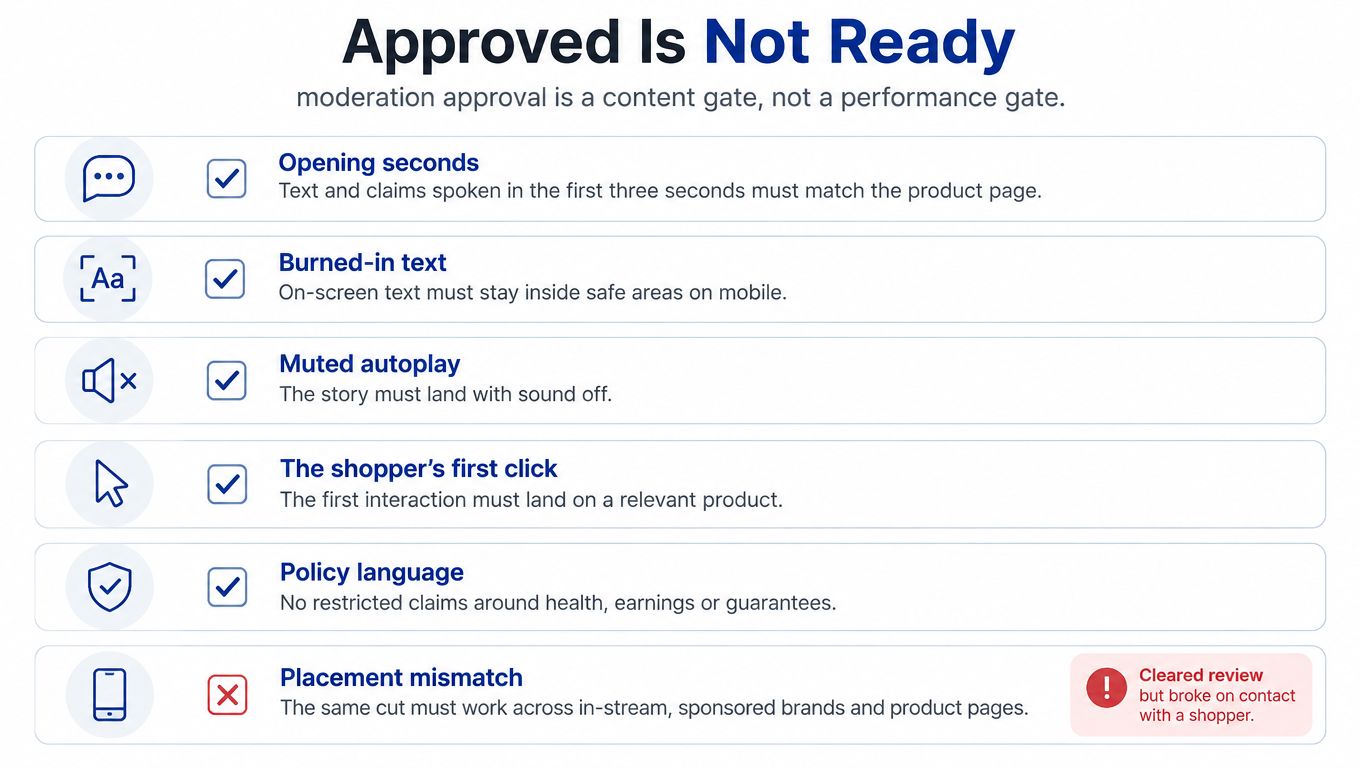
Moderation approval is a content gate, not a performance gate. The most dangerous asset is often not the rejected file. It's the technically accepted video that becomes confusing when muted, cropped, compressed, or viewed on a small screen.
The post-approval review should test five conditions:
- Muted autoplay: Can the shopper understand the product without sound?
- Mobile scale: Do product details and text remain legible on a small screen?
- Cropping: Does the composition survive a vertical derivative or a tighter player?
- Contrast: Does essential copy remain readable in bright viewing conditions?
- Audio consistency: If audio is available, does it remain comfortable after platform normalization?
A reviewer should watch the asset without knowing the script. Ask them to identify the product, main benefit, and next action. If the answer depends on a voiceover cue or a caption that appears too briefly, revise the edit.
Test the contact point
A shopper doesn't experience your asset in an editing suite. They encounter a thumbnail, an autoplay moment, a compressed stream, and a product detail page. The first frame must identify the product quickly, while the closing frame must align with the destination they reach after clicking.
Review logos, captions, and product claims against safe areas. Check whether text competes with the product itself. Then test the same cut on a mobile device and in a muted player before launch.
Approval answers “Can this file run?” Performance testing answers “Can a shopper act on it?”
That distinction matters for PPC strategy. A technically approved video that fails to communicate can waste impressions, suppress click quality, and make a profitable campaign look like a bidding problem.
Preflight Matrix and Export Presets
Build one placement-specific preflight matrix before anyone submits an asset. Keep it beside the creative brief so the editor, reviewer, and media buyer work from the same requirements instead of searching through platform documentation.
Amazon Video Preflight Matrix
| Placement | Container | Codec | Resolution | Bitrate | Audio | Duration |
|---|---|---|---|---|---|---|
| Sponsored Products | Confirm in the advertising console | H.264 profile for the approved placement | Horizontal 16:9 currently supported, with 9:16 expected in 2026 | Placement-specific | Removed | Minimum 7 seconds |
| Sponsored Brands | MP4 or MOV | H.264 or H.265 | 1280 × 720, 1920 × 1080, or 3840 × 2160 | 1 Mbps minimum, 4 Mbps or higher recommended | PCM, AAC, or MP3, minimum 96 kbps and 44.1 kHz | 6 to 45 seconds |
| DSP Online Video | Site-served profile or certified tag delivery | Placement-specific | 1920 × 1080 minimum for horizontal site-served assets | 4 Mbps minimum, 8 Mbps recommended | 192 kbps minimum, 44.1 or 48 kHz | 6 to 120 seconds |
| Streaming TV / Prime Video | Destination-specific | Destination-specific | 1920 × 1080 minimum horizontal | 15 Mbps minimum for Prime Video, 8 Mbps for several other environments | Destination-specific | Confirm by destination |
Use named presets such as SBV-Master, SPV-Silent, DSP-OVC, and STV-HD. The names should identify the placement and viewing condition. Keep bitrate, codec, and container settings tied to each preset because Amazon's requirements differ by destination.
Amazon will re-encode much of what you upload. Your export should present a clean, compliant file for review and delivery before Amazon's transcoding pipeline reshapes it. A technically correct master still needs a placement-specific check after export.
Run this QA loop for every version:
- Render the file for its intended placement.
- Validate the container, codec, dimensions, bitrate, frame rate, and file size.
- Mute the video and watch it at normal speed.
- Check the crop, text position, and safe areas.
- View the exported file on a mobile device.
- Submit it only after human review passes.
Keep product-page video production connected to instructions for adding a video to an Amazon listing. Product footage can serve both paid discovery and retail content, but export separate delivery files. Listing video and ad video face different placement controls, durations, and viewing conditions.
Measuring Video Beyond Last-Click Conversions
Last-click ROAS undervalues video because video often creates demand before the shopper searches, clicks, or buys. Amazon's reported Ultima Replenisher campaign illustrates the point: exposure was associated with a new-to-brand rate rising from 38% to 75%, a 37-percentage-point improvement, along with a 10.6% lift in brand attitudes and a 4.5% lift in consideration among consumers aged 18 to 24, according to Amazon's Ultima Replenisher case study.
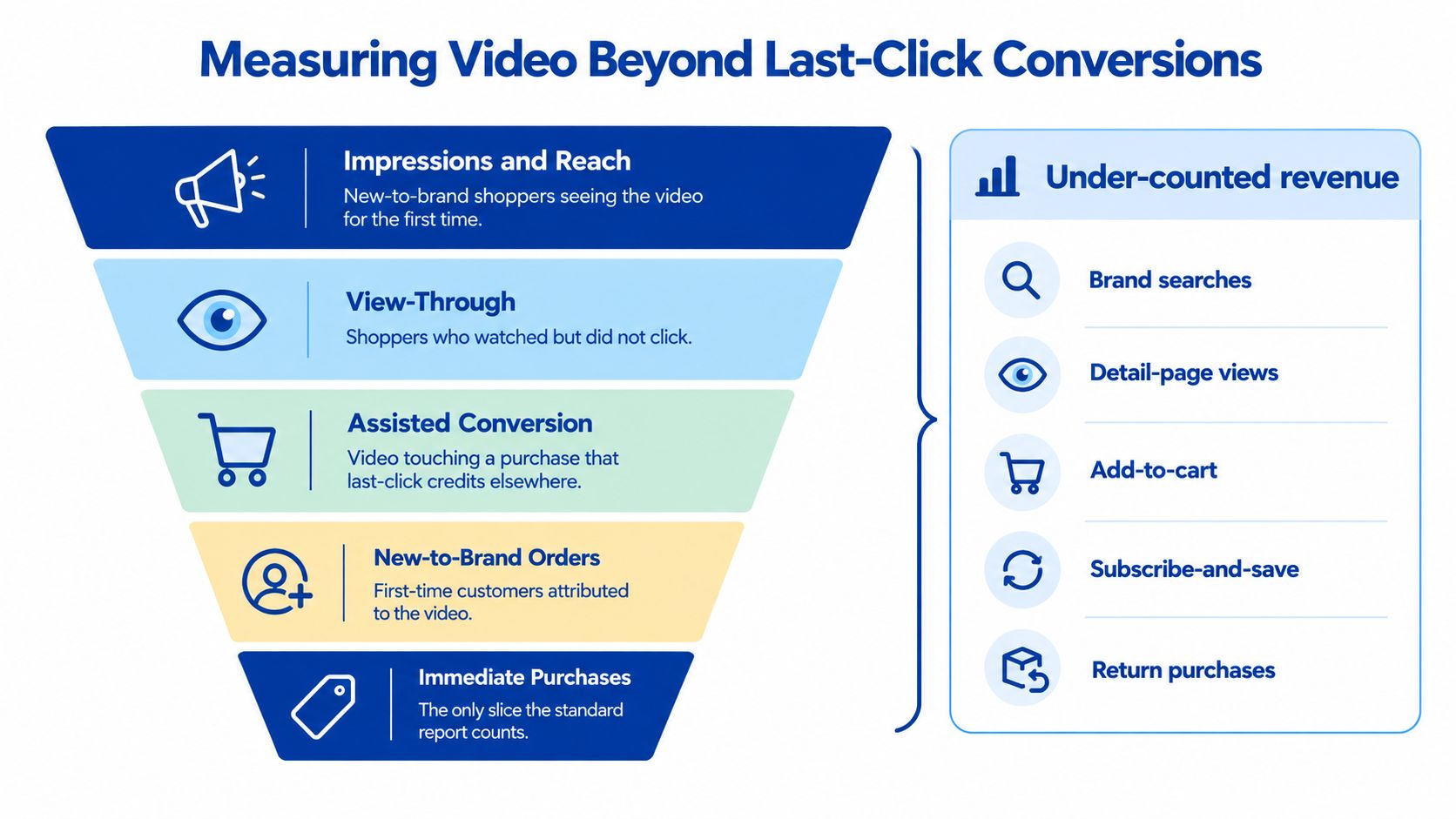
Track incremental reach, new-to-brand purchases, branded search demand, detail-page engagement, and assisted purchase behavior alongside direct conversion. Amazon Marketing Cloud can help teams compare exposed and unexposed audiences, while resources such as Captapi's guide to engagement metrics can help structure the engagement layer.
Headline Marketing Agency applies Amazon PPC and DSP strategy with measurement that connects video exposure to profitability, organic ranking, and long-term brand equity. Visit Headline Marketing Agency to build placement-specific video workflows, connect creative testing to Amazon Marketing Cloud insights, and scale campaigns beyond last-click ROAS.
Get Your Free Amazon PPC Audit
Discover untapped growth opportunities and see how our data-driven approach can improve your ROAS.
Get Free Audit →Ready to Transform Your Amazon PPC Performance?
Get a comprehensive audit of your Amazon PPC campaigns and discover untapped growth opportunities.