Amazon Display Ads Specs: The Complete 2026 Reference
Amazon display ads specs explained: dimensions, file sizes, aspect ratios, asset rules, and validation errors to avoid in 2026 campaigns.

The most popular advice about Amazon display ads specs is also the least useful: pick a few standard sizes, resize the master creative, and upload everything. That approach creates assets that technically fit but fail in production. Text becomes unreadable, product details disappear inside narrow placements, file limits trigger rejections, and a campaign can serve impressions that shoppers barely see.
Amazon display ads specs are better understood as production constraints. Dimensions determine eligibility, source resolution protects legibility, file weight affects delivery, policy rules govern acceptance, and viewability determines whether a served impression had a meaningful chance to be noticed. The brands that scale display efficiently build a controlled asset system before launch, then connect creative decisions to profitable retail outcomes, organic visibility, and sustainable growth.
What Amazon Display Ads Specs Actually Govern
A specification sheet governs more than canvas size. It defines the contract between your creative library and Amazon's delivery system, including what can upload, where an asset can appear, and how reliably it renders once served.
Three operational outcomes matter most:
- Production efficiency: Designers need repeatable source files, export settings, and naming conventions for each placement.
- Policy compliance: Amazon reviews file type, weight, borders, branding, claims, rights, and destination consistency, not just pixel dimensions.
- Visible exposure: A served impression isn't automatically a visible or useful impression. Rendering, placement, tracking, and viewability need separate checks.
A 300 × 250 asset and a 320 × 50 asset may promote the same product, but they don't offer the same design problem. One can carry a product image, headline, benefit, logo, and CTA. The other has almost no room for copy, and Amazon requires higher-resolution source artwork for that mobile format. Treating both as simple exports from one master usually produces the wrong hierarchy.
Practical rule: Build the asset library around placements first, then adapt the message to each canvas. Don't start with one finished banner and ask production to make it fit everywhere.
A workable system begins with a placement matrix. Record the served dimensions, source dimensions, safe zone, file-weight ceiling, file type, destination requirements, and QA owner. Keep desktop and mobile compositions separate, even when they share the same campaign message.
Amazon's ecommerce display specifications identify a core set of desktop and mobile placements, while standard-display guidance supports more than 60 desktop and mobile sizes and permits up to 10 assets per ad. That breadth makes modular production more practical than ad hoc resizing. The objective isn't to create maximum volume. It's to create enough controlled variation to preserve legibility and test which audience, placement, and message combinations support profitable growth.
Desktop Display Sizes and File Weights
Desktop display specs are production constraints, not a checklist of dimensions. Amazon identifies five core units: the 300 × 250 medium rectangle, 728 × 90 leaderboard, 160 × 600 wide skyscraper, 300 × 600 large rectangle, and 970 × 250 billboard. Static assets generally use JPG or PNG-8, but each placement has its own file-weight ceiling. An export approved for one slot can fail review in another. Amazon's ecommerce display specifications list the placement-specific requirements.
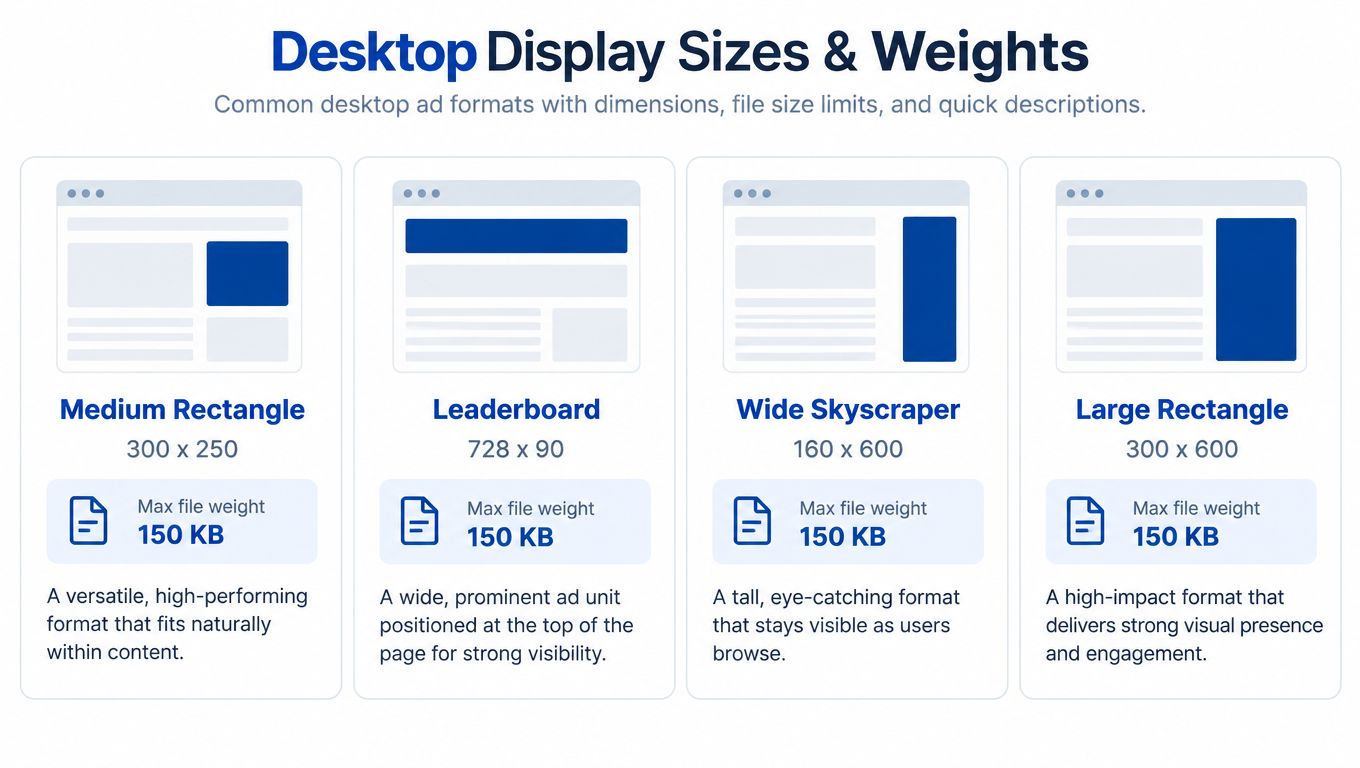
| Placement | Served dimensions | Static file weight | Production implication |
|---|---|---|---|
| Medium rectangle | 300 × 250 | 40 KB | Keep the product and offer visually dominant |
| Leaderboard | 728 × 90 | 40 KB | Use a short headline and a clear CTA |
| Wide skyscraper | 160 × 600 | 40 KB | Stack the hierarchy vertically |
| Large rectangle | 300 × 600 | 50 KB | Allow more product context without crowding |
| Billboard | 970 × 250 | 200 KB | Build a wide composition, not a stretched rectangle |
The 160 × 600 and 300 × 600 formats expose weak asset libraries quickly. A folder containing only a medium rectangle and leaderboard leaves tall desktop inventory unsupported. Vertical units need their own crop, logo position, and reading order. A headline placed comfortably across the top of a 300 × 250 can become cramped or unreadable in a narrow column.
AI-generated assets increase that risk. A tool may produce attractive imagery at the wrong aspect ratio, place text too close to an edge, or make the product too small after cropping. Treat generated creative as a draft. Check every placement at served dimensions, then compress the approved export and confirm that the file still meets its slot limit.
The billboard needs a separate layout rather than a resized rectangle. Its 200 KB ceiling allows more image detail than smaller desktop units, but extra width does not justify extra copy. Put the product or focal image where the eye enters the frame, keep required text away from edges, and test legibility against the page background.
Standard-display guidance identifies 970 × 250 as a large format that may use a 30% in-view threshold for one continuous second, rather than the usual 50% display threshold. Amazon's standard-display policy guidance provides the relevant reference. The threshold changes how delivery data is read, not the production standard. The value proposition still needs to appear quickly, survive real rendering, and pass a pre-launch check for dimensions, weight, crop, and contrast.
Mobile and Tablet Placement Requirements
Mobile is where a desktop-first workflow breaks fastest. Amazon requires 2× source artwork for key narrow placements, and those assets must survive real handset rendering, compression, and limited attention. The served size is not the same as the file you should hand to production.
The 320 × 50 mobile leaderboard requires source artwork at 640 × 100. The 414 × 125 detail or search-results unit requires 828 × 250 artwork and a 640 × 250 safe zone. Amazon also recommends a minimum 16-point font at 2× resolution, minimal copy, restrained imagery, and a visible non-white one-pixel border or high-contrast background. Amazon's mobile banner specifications contain the relevant production rules.
| Placement | Source size, 2× | Safe zone | Max file weight |
|---|---|---|---|
| 320 × 50 mobile leaderboard | 640 × 100 | Not separately stated | 50 KB |
| 414 × 125 detail or search-results placement | 828 × 250 | 640 × 250 | 100 KB |
| 300 × 250 mobile medium rectangle | Placement-specific export | Placement-specific review | 40 KB |
| 728 × 90 tablet leaderboard | Placement-specific export | Placement-specific review | 200 KB |
The 320 × 50 unit is a severe compression exercise. Use one short benefit or offer, a recognizable product shape, and a CTA that remains distinguishable at handset scale. Don't carry over a desktop paragraph, decorative background, and oversized lifestyle scene. There isn't enough visual area.
The 414 × 125 placement gives you more room, but it still needs a mobile composition. Keep the key content within the safe zone, test the asset on an actual mobile screen, and verify that the logo doesn't compete with the headline. The 300 × 250 can support more information, yet it still shouldn't become a miniature product-detail page.
Tablet inventory can resemble desktop inventory dimensionally, but that doesn't make desktop exports automatically safe. Review contrast, type rendering, and compression at the intended device density. Animated GIFs are permitted for Amazon DSP mobile banners but aren't recommended, so static assets are usually the cleaner starting point when clarity and acceptance speed matter.
One Master Creative vs Placement-Specific Layouts
One master creative is efficient only until it damages the message. Resizing a 300 × 250 composition into a 160 × 600 skyscraper can leave the headline microscopic, push the CTA below the focal point, and crop away the product feature that made the ad persuasive. Stretching the same asset into a 970 × 250 billboard creates the opposite problem, with empty space, weak balance, or copy scattered across a wide canvas.
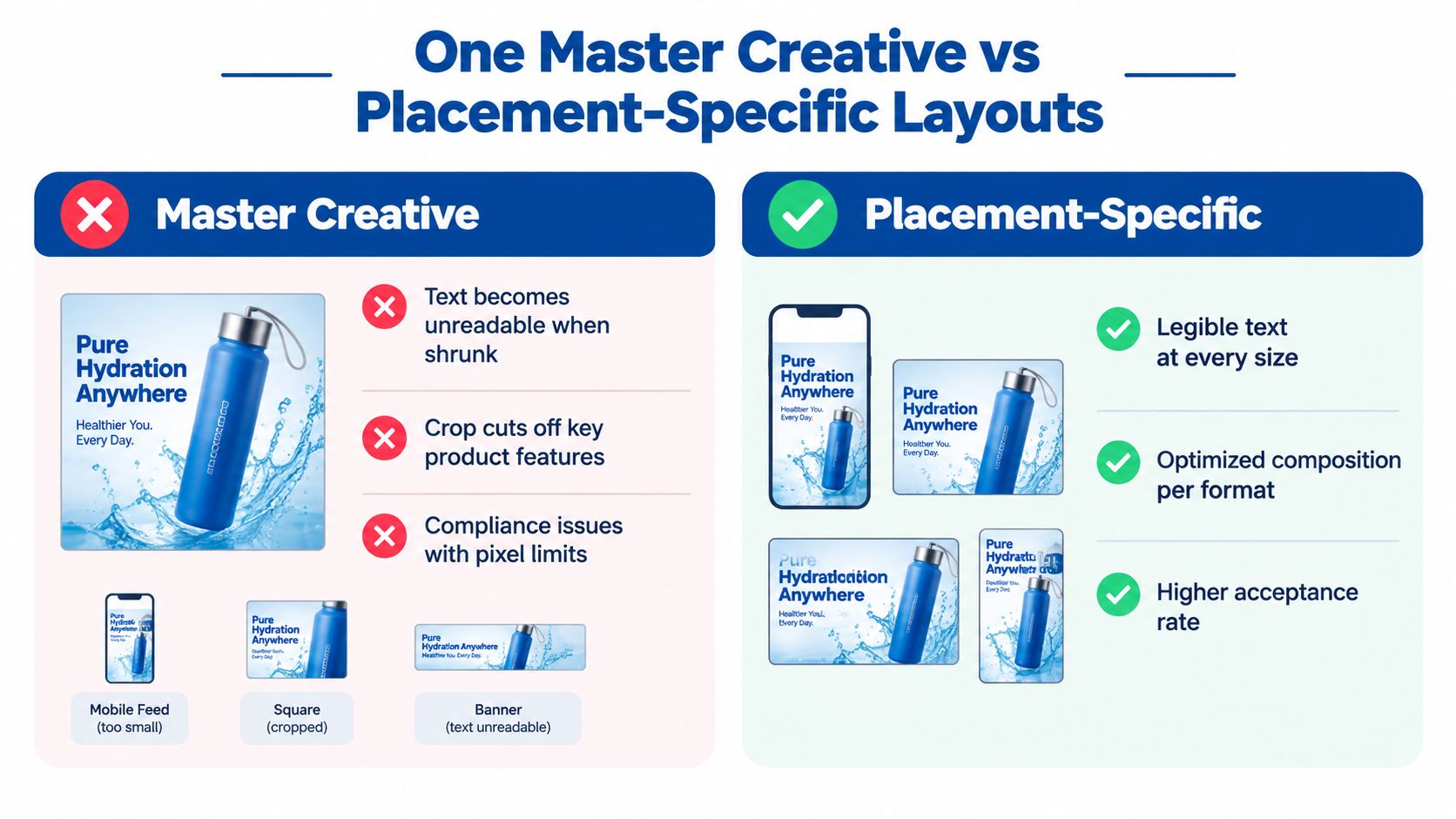
Amazon lists desktop formats such as 300 × 250, 728 × 90, 160 × 600, and 300 × 600, while mobile placements include 320 × 50, 414 × 125, and 300 × 250. Several mobile formats require 2× creative dimensions and separate safe-zone treatment, which is why Amazon's DSP desktop specifications support a placement-specific approach rather than a universal resized master.
Keep these elements consistent
Your asset system should preserve the pieces that create brand recognition and message continuity:
- Product identity: Show the correct product, packaging, variant, and meaningful feature.
- Offer logic: Keep the promotion, price framing, or benefit accurate across placements.
- Brand hierarchy: Maintain recognizable colors, logo treatment, and tone.
- Destination promise: Make sure the ad's claim matches the landing page and locale.
Adapt these elements deliberately
The composition should change according to the canvas:
- Headline length: Reduce copy for narrow banners and retain only the strongest benefit.
- Logo scale: Increase or reduce it based on available space, without sacrificing recognition.
- CTA placement: Position the action where it remains inside the safe area and visually distinct.
- Focal-point crop: Recompose the product image rather than allowing automatic cropping to decide what shoppers see.
- Reading order: Use vertical sequencing for skyscrapers and compact horizontal sequencing for leaderboards.
The operating standard: Resize when the hierarchy remains legible. Redesign when the aspect ratio changes the reading order.
A useful handoff includes a master message brief plus layout files for each major placement family. The designer shouldn't need to improvise which product feature survives a crop or which words can be removed. That decision belongs in the creative strategy, before production begins.
File Formats, Animation Rules, and Creative Acceptance Policy
Pixel dimensions are only one part of acceptance. Amazon evaluates file type, weight, branding, destination, rights, and claim accuracy, so a visually polished asset can still fail review.
For static display, JPG and PNG-8 are common choices. They're efficient for product photography, flat color, and simple graphic treatments, but compression needs testing at the exact placement limit. A small text line that looks acceptable in the design file can turn muddy after export. Teams working with camera originals may also benefit from a practical reference on RAW formats for Mac before converting source photography into web-ready assets.
HTML files can support richer behavior in eligible placements, but they introduce additional QA. Check initial load weight, total asset weight, click behavior, fallback rendering, and third-party tracking before launch. A unit that works in a browser preview may still fail inside Amazon's serving environment.
Policy checks that sit above dimensions
Amazon's standard-display guidance supports more than 60 desktop and mobile sizes, sets a 500 KB maximum file size for all sizes, and allows up to 10 assets per ad, including original and AI-generated assets. That broad asset allowance is useful for controlled variation, but it can also multiply review work.
Run these checks before upload:
- Destination branding: Mobile banners linking to Amazon must include an Amazon logo or textual Amazon reference under the Creative Acceptance Policy.
- Overlay behavior: Amazon automatically adds an AdChoices label, so leave enough visual separation for the ad to remain balanced.
- Rights documentation: Keep permissions for logos, images, music, and other creative elements with the campaign record.
- Claim substantiation: Maintain evidence for factual claims and be prepared to provide it if Amazon requests verification.
- Animation review: Amazon permits animated GIFs in relevant mobile formats but doesn't recommend them. Inspect motion for distraction, readability, and fallback behavior.
The policy checklist supplied in some creative workflows may include limits that don't apply uniformly to every Amazon placement. Treat the live specification and acceptance policy for the selected product as the authority. Don't copy a generic checklist into production without reconciling it against the intended inventory.
AI-Generated Creative Within Amazon's Specs
AI-generated assets increase output, but they also increase the number of ways a campaign can become inaccurate. Amazon allows original and AI-generated assets within standard display workflows, and newer responsive ecommerce creative can use product imagery from a detail page, custom uploads, or AI-generated images. That permission doesn't make every generated scene safe to publish.

Amazon requires AI-generated content not to mislead customers, including photorealistic but inaccurate depictions or imagery that mimics real people without consent. Advertisers must also maintain rights and permissions for creative elements and provide factual substantiation when requested. Amazon's AI-generated content guidance makes the practical distinction clear: AI accepted is not the same as AI low-risk.
A generated lifestyle scene might show the product in an environment it isn't designed for. A synthetic person might resemble a real individual. An automatically assembled headline might imply a performance outcome that the product cannot support. At scale, these errors can enter through combinations rather than through the original asset itself.
A defensible approval workflow
- Record asset provenance. Save the source image, generation tool, prompt or transformation history, editor, and final export.
- Verify every claim. Match benefit statements, comparisons, discounts, and product attributes against approved product and legal information.
- Check rights and likeness. Confirm permission for logos, music, images, model likenesses, and any supplied reference material.
- Review locale fit. Validate language, currency presentation where relevant, cultural context, landing page, and product availability for each market.
- Inspect generated combinations. Human reviewers should examine assembled variants, not only approve individual components.
The last step is where many automated workflows weaken. A product image may be accurate alone, and a lifestyle background may be acceptable alone, yet their combination can imply an unsupported use case. Keep a record of approved combinations, rejected combinations, and the reason for each decision.
Automation should expand controlled testing, not replace accountability. Every variant still represents a customer-facing claim.
Validation Errors That Block Display Launches
The fastest QA process maps each likely rejection to one owner and one fix. Don't wait for Amazon's review response to discover that the source file was built at the served size or that a mobile banner lacks required branding.
| Failure mode | Why it blocks or weakens delivery | Fix before upload |
|---|---|---|
| Missing 2× mobile artwork | Source may render soft on high-density screens | Export 640 × 100 for 320 × 50 and 828 × 250 for 414 × 125 |
| File exceeds placement limit | Amazon may reject the asset or prevent use in that slot | Compress the exact export and inspect text after compression |
| White background without contrast | Mobile guidance calls for a non-white one-pixel border or high-contrast background | Add a visible border or redesign the background |
| Copy is too small | Shoppers can't read the value proposition at device scale | Apply the recommended 16-point font at 2× resolution and remove low-value copy |
| Missing Amazon reference | Banners linking to Amazon need an Amazon logo or textual reference | Add the approved logo or wording |
| Broken click tracking | Delivery may occur without reliable measurement | Test every click path, redirect, and tracking parameter |
| Locale mismatch | Ad, audience, landing page, and language don't align | Review the full customer path in the target market |
Use a preflight folder with the final served-size export, source file, compression proof, destination URL, policy notes, and reviewer approval. A browser preview is not enough. Open the compressed asset on a handset, test the click, and inspect how the landing page responds.
For teams producing many variants, an AI design tool can help organize layout iteration, but automation still needs human acceptance checks. The tool can accelerate composition. It can't verify that a generated claim is substantiated or that a destination matches the campaign locale.
How Spec Compliance Connects to Profitable Display
Spec compliance gets an asset approved. It does not make the campaign profitable. A creative can upload successfully and still waste spend if impressions are not visible, off-Amazon reach is combined with onsite results, or performance is judged only by clicks rather than retail impact.
The MRC viewability standard generally counts a display impression when at least 50% of pixels remain continuously in view for one second. Large formats of 242,500 pixels or more, including 970 × 250, may use a 30% in-view threshold for one continuous second. Treat served impressions, viewable exposure, clicks, conversions, and incremental demand as separate measurement layers. A delivered impression is not automatically a meaningful opportunity to buy.
Amazon display delivery can include Amazon and off-Amazon inventory, with impression and click ad-server tracking available. That reach can extend prospecting, but reporting should separate onsite and offsite performance. A low-cost offsite impression should not appear equivalent to a product-detail-page exposure with stronger purchase intent.
Build the asset matrix around business jobs
Match each approved asset to its audience and funnel role:
- Prospecting: Lead with product education, category relevance, or a clear differentiator.
- Consideration: Use proof, product features, comparison-safe benefits, or a stronger reason to choose the brand.
- High intent: Use concise offers, replenishment cues, cross-sell messages, or product-page defense.
- Measurement: Compare qualified traffic, conversions, new-to-brand outcomes where available, profitability, and downstream branded demand by audience and placement.
The organic-growth connection requires disciplined allocation. Display may support branded demand and encourage more shoppers to return to a product detail page, but organic improvement should not receive display credit without a measurement design that separates correlation from incrementality. Headline's PPC and DSP approach treats paid media as a lever for profitability, organic ranking, and sustainable scale, rather than a reason to maximize impressions at any cost.
Approve every display asset through three gates: spec compliance, human readability, and commercial usefulness. A creative that passes only the first gate is not ready to scale.
Headline Marketing Agency helps consumer brands plan and manage Amazon PPC, Display, and DSP programs with creative QA tied to profitability, organic growth, and sustainable scale. Teams needing a placement-specific asset system, campaign structure, and measurement plan can visit Headline Marketing Agency to discuss their next stage of Amazon growth.
Get Your Free Amazon PPC Audit
Discover untapped growth opportunities and see how our data-driven approach can improve your ROAS.
Get Free Audit →Ready to Transform Your Amazon PPC Performance?
Get a comprehensive audit of your Amazon PPC campaigns and discover untapped growth opportunities.