Sponsored Display Product Targeting That Drives Growth
Master sponsored display product targeting to defend listings, conquest competitors and scale profitably. Setup, bids, optimization and real Amazon results

You're watching a competitor's sponsored ad appear on your own product detail page. Your listing has the reviews, the inventory, and the conversion history, yet a rival is using your traffic to introduce an alternative at the exact moment shoppers are deciding what to buy. Meanwhile, your Sponsored Display campaign is generating impressions, but the dashboard keeps pulling you back toward one question: is the ACOS low enough?
That question is too narrow. Sponsored Display product targeting can defend shelf space, intercept competitor demand, create incremental detail-page traffic, and support organic growth, but only when you treat it as a controlled profitability lever rather than another campaign type to launch and forget. Amazon's targeting system has also changed. Product targeting evolved into contextual targeting, expanding delivery beyond the Amazon store while preserving the products and categories advertisers select. Amazon's announcement describes that broader availability as effective June 23, 2022.
The practical challenge is deciding where manual control still matters as Amazon adds contextual expansion and automatic targeting. This guide gives you that decision framework, with a focus on contribution, incremental lift, organic rank, and sustainable scale. For a broader view of how display fits into an Amazon growth program, review Headline's Amazon display advertising strategy.
Why Sponsored Display Product Targeting Still Wins Shelf Space
A brand selling premium kitchen storage products noticed a familiar problem. Its hero ASIN was attracting strong detail-page traffic, but competitor placements kept appearing beside the image gallery and customer reviews. Shoppers were comparing similar products on the brand's own shelf, and the brand had no deliberate defense campaign for that page. The issue wasn't a lack of visibility. It was unprotected visibility.
A tightly built Sponsored Display product-targeting campaign changes the contest. Instead of relying only on keyword demand, the brand can target relevant competitor products, complementary products, and category segments where shoppers are already evaluating solutions. Amazon describes product targeting as a way to reach shoppers browsing similar or complementary products, including visibility on product detail pages and shopping results. Amazon's product-targeting guidance supports the core use case, defend high-intent pages and intercept demand before the shopper leaves the category.
Defense and conquesting require different economics
Detail-page defense protects a brand's existing conversion opportunity. Target your own ASINs, closely related variants, and strategically important pages where competitors can divert demand. The goal isn't to create a dramatic click volume spike. It's to keep qualified shoppers inside your product family and reinforce the brand's relevance during comparison.
Category conquesting is more selective. Target competitor ASINs or refined categories where your product has a credible reason to win. A cheaper alternative, a stronger rating, Prime eligibility, or a clear feature advantage can justify conquesting. Without that advantage, the campaign often pays for low-intent curiosity.
Headline's view is straightforward: PPC should create commercial momentum that organic ranking can compound. Sponsored Display can contribute by driving qualified shoppers to detail pages, supporting sales velocity, and helping brands expose products where category demand already exists. ACOS still matters, but it's a guardrail, not the entire investment thesis.
Practical rule: If a target already receives strong algorithmic coverage and produces no incremental detail-page engagement, manual targeting may be duplicating reach rather than creating growth.
Amazon now describes Sponsored Display product targeting as contextual targeting, with ads able to reach shoppers on Amazon and beyond it. That makes the old approach, building a large ASIN list and assuming every target deserves equal attention, less effective. Manual targeting wins when it gives you control over a commercially important page, audience segment, or competitive context that automation doesn't isolate cleanly.
The takeaway is simple: use manual product targeting for precision and defense, use contextual and automatic expansion for qualified scale, and measure whether each layer adds something new.
What Sponsored Display Product Targeting Is and How It Works Now
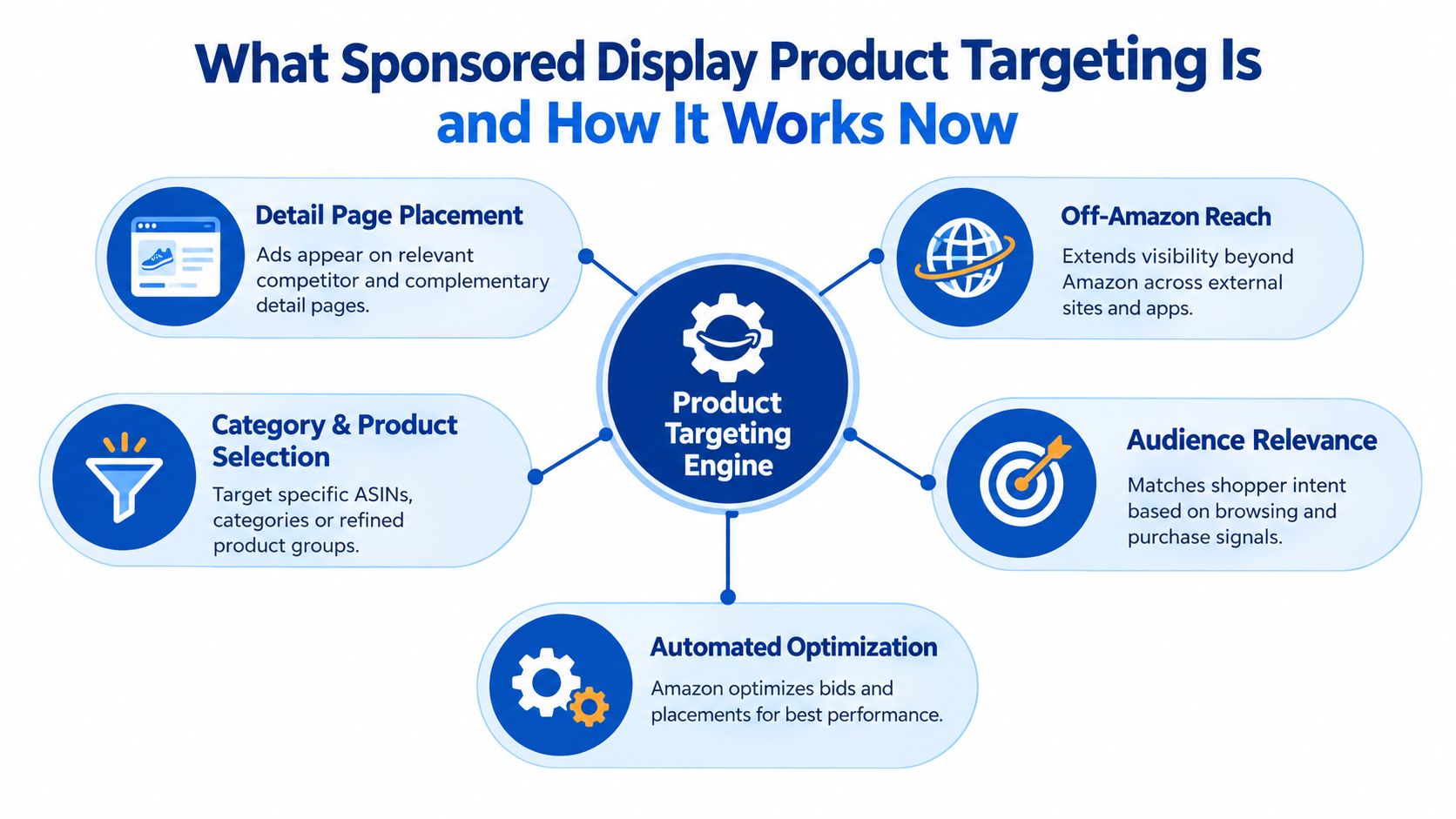
Sponsored Display product targeting lets advertisers select products or categories that define the shopping context they want to enter. In Sponsored Products, product targeting primarily controls where ads can appear across shopping results and product detail pages. In Sponsored Display, the same strategic idea now operates across a broader contextual system.
The targeting object is still familiar
You can build around:
- Specific ASINs, useful for competitor defense, conquesting, and complementary-product placement.
- Categories, useful for reaching broader but relevant demand.
- Refined product groups, using attributes such as price range, brand, Prime eligibility, and ratings. Amazon's guidance confirms these refinements are available for product targeting. Amazon's targeting documentation provides the underlying framework.
Those filters are not decoration. They determine whether your ad competes in a commercially relevant environment or gets exposed beside products your offer can't realistically beat. A premium product shouldn't automatically target every item in its category. Narrow the environment around shoppers who can plausibly convert.
Contextual targeting expands the surface
Amazon announced that product targeting had evolved into contextual targeting, extending reach to web pages and mobile apps outside the Amazon store when content relates to the selected products or categories. Advertisers don't need to replace their existing product or category targets to access that expansion. Amazon's contextual targeting update makes the operational implication clear: the targeting object stays familiar, while Amazon expands where the ad may be delivered.
That creates two distinct planning questions:
- What shopping context should the campaign enter?
- How much delivery should Amazon control once that context is selected?
The first question is strategic. The second is an automation decision.
Sponsored Display is no longer only an on-site placement tactic
A detail-page placement remains valuable because it catches shoppers close to purchase. Off-Amazon contextual reach serves a different role. It can extend product discovery to related content and help maintain consideration beyond the immediate Amazon session. Don't judge both surfaces through the same lens. Detail-page defense should be evaluated for conversion quality and share protection. Broader contextual reach should earn its budget through qualified engagement and downstream sales.
Amazon's newer campaign options reinforce this shift. In August 2025, Amazon added automatic targeting for Sponsored Display Conversion campaigns while retaining manual targeting as an option. Amazon's automatic targeting update reflects a broader move toward machine-learning-led delivery.
Your mental model should be precise: manual targets define the commercial territory, contextual targeting expands eligible surfaces, and automation decides where delivery may find additional conversion opportunities.
How to Set Up Product Targeting Campaigns Without Wasting Spend
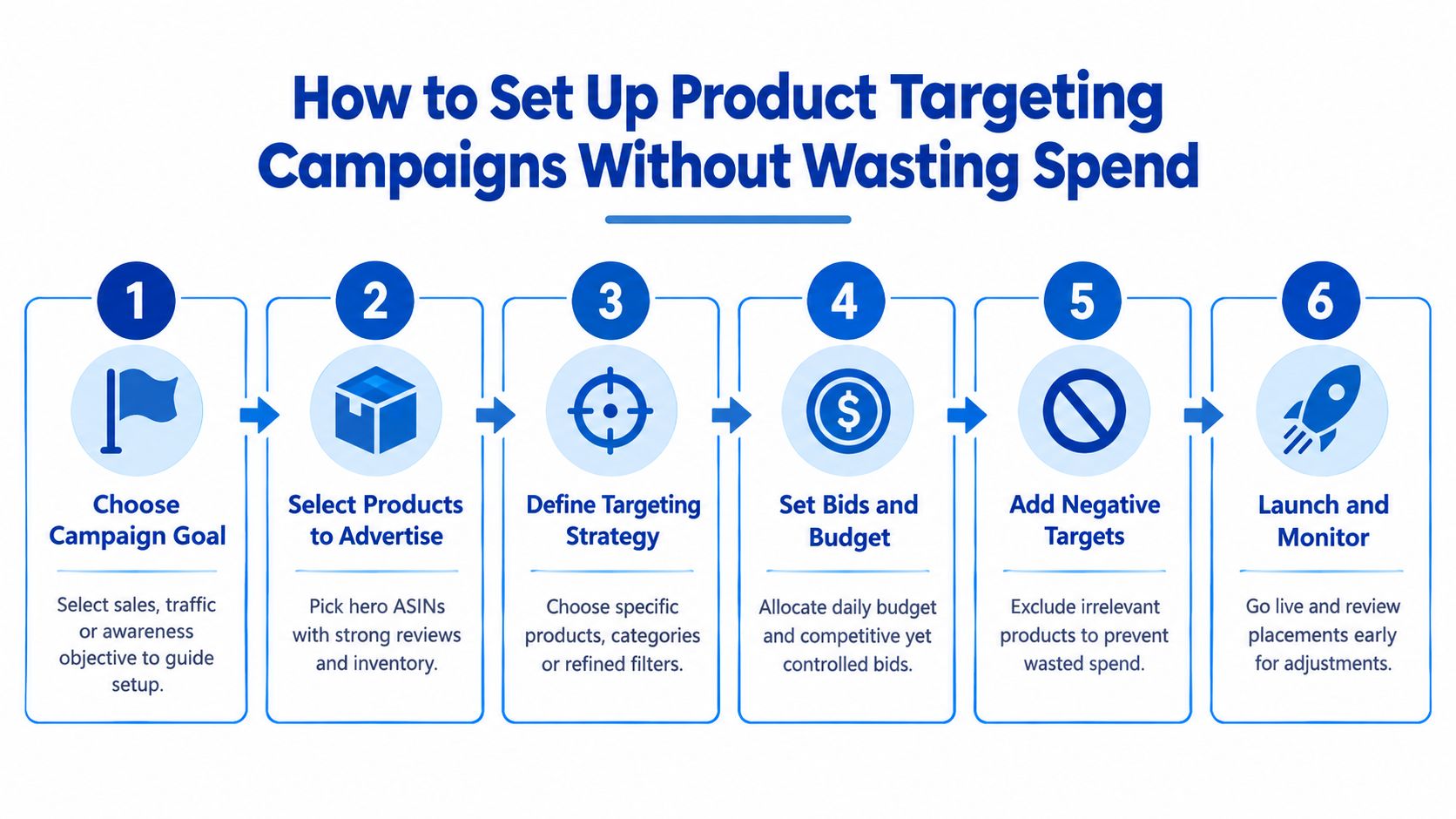
Start with the product, not the targeting menu. Sponsored Display can only amplify a credible offer. If the advertised ASIN has weak retail readiness, limited inventory, poor imagery, or an unconvincing detail page, targeting will buy attention without creating enough conversion value to justify the spend.
Set the campaign around one commercial job
Separate defense from conquesting. Don't combine your own detail-page targets, aggressive competitor targets, complementary products, and broad category refinements inside one campaign. Those audiences behave differently, and a blended report makes bid decisions unreliable.
A clean structure might include:
- Brand defense, focused on your own products and close variants.
- Competitor conquesting, focused on selected ASINs where your offer has a strong reason to win.
- Complementary placements, focused on products that naturally precede or follow the purchase.
- Category refinement, focused on a narrow product environment rather than an entire department.
Give each group its own budget logic. A defense campaign may justify stable delivery because it protects valuable branded demand. Conquesting needs stricter review because it can attract comparison shoppers without enough purchase intent.
Choose ASINs when control matters
Use specific ASIN targeting when you can name the page you want to influence. This is the right choice for a high-value competitor, a vulnerable detail page, a complementary product with obvious relevance, or a small set of pages where your merchandising team has identified a share opportunity.
Use categories when the market is broad enough that a page-by-page list would miss demand. Then refine aggressively by price, brand, Prime eligibility, and ratings. The question isn't whether Amazon offers a broad category. The question is whether the resulting shopping environment matches your offer and margin.
Automatic targeting deserves a test, especially for Conversion campaigns. Let it explore when you need discovery and have enough reporting discipline to identify where spend goes. Keep manual control when the campaign has a specific defensive or conquesting responsibility.
A manual target should earn its place by creating control, not by making the campaign look sophisticated.
Build exclusions before launch
Negative targeting is a profitability tool. Exclude products with incompatible price points, irrelevant use cases, weak conversion potential, or poor commercial fit. Remove targets that attract clicks from shoppers who are unlikely to accept your offer.
Choose hero ASINs with reliable availability and a detail page that can convert traffic. Keep advertised products tightly related within a campaign so the report tells a coherent story. If multiple ASINs have different price or margin profiles, separate them rather than forcing a single bid logic across all of them.
Use the campaign objective to decide how much exploration you can tolerate. A conversion-focused campaign needs sharper target selection and faster pruning. A traffic or awareness objective can accept broader reach, but it still needs a clear reason to exist.
For teams comparing manual builds with automated creative and targeting workflows, dynamic product ad automation offers useful context on how automation can reduce repetitive campaign operations. Automation can accelerate execution, but it doesn't replace the commercial judgment required to decide which products, pages, and audiences deserve investment.
Before launch, confirm the advertised products, campaign objective, target groups, exclusions, bids, budget, and measurement plan. Don't launch a broad campaign and promise to “optimize later.” The first structure determines whether later data is useful or contaminated by mixed intent.
Bidding and Budget Strategy for Profitable Growth
A profitable Sponsored Display bid starts with the value of the shopper, not the bid recommendation in the console. Your acceptable bid depends on margin, conversion probability, customer value, inventory position, and whether the campaign is defending existing demand or creating new demand.
High-intent detail-page targets deserve the clearest economics. A competitor ASIN with strong relevance and a realistic path to conversion can support a more assertive bid than a broad category placement. Contextual reach outside the store needs tighter scrutiny because the path from exposure to purchase is less direct.
Separate intent before changing bids
Use campaign segmentation to make the economics visible. If one campaign mixes your own ASINs with broad category targets, a blended ACOS can hide the fact that defense is profitable while category expansion wastes budget. Separate campaigns let you adjust bids according to the job each target performs.
| Campaign Intent | Target Example | Bid Approach | Success Metric |
|---|---|---|---|
| Brand defense | Your own hero ASIN and close variants | Protect delivery while keeping bids within contribution limits | Promoted sales, total sales, detail-page engagement |
| Competitor conquesting | A relevant rival ASIN with a clear product advantage | Start controlled, then increase only where conversion quality supports it | Incremental sales and new-to-brand customers |
| Complementary demand | A product naturally used with your advertised item | Use a measured bid tied to cross-sell potential | Purchased products and assisted category demand |
| Refined category reach | A narrow category filtered by price, brand, Prime eligibility, or ratings | Keep bids conservative until the segment proves itself | Qualified traffic, sales efficiency, and incremental reach |
| Automated discovery | Sponsored Display Conversion campaign with automatic targeting | Give automation room to explore, but isolate the budget | New converting targets and incremental performance |
Budget pacing matters as much as the bid. A campaign that exhausts its budget early can miss later demand, while an underfunded campaign may never generate enough evidence to judge its targets. Allocate more budget to campaigns with a defined growth role and reliable conversion signals. Keep exploratory campaigns bounded until they prove they can contribute.
Headline's profitability-first perspective also changes how you read ACOS. A higher ACOS can be rational when you're defending a strategic page, launching a product, or acquiring new-to-brand customers with future value. A low ACOS can still be a poor result if the campaign only captures sales that another campaign would have won anyway.
For broader display planning, use display advertising best practices as a reference, but keep the decision anchored to your own unit economics and business objective.
When automation should take over
Let automation expand when you've defined the category context, set sensible exclusions, and have a measurement window short enough to catch waste. Keep manual targeting when a target is strategically important and requires page-level control. Don't let automation replace a defense strategy, and don't manually manage hundreds of targets that Amazon can explore more efficiently without producing incremental value.
A useful rule is to fund precision first, then exploration. Scale only after the campaign demonstrates that its additional reach creates additional commercial outcomes.
Measuring and Optimizing Performance the Right Way
Sponsored Display product targeting deserves a measurement system that separates delivery from contribution. Impressions and clicks show whether Amazon found opportunities. They do not show whether those opportunities created profitable, incremental demand or merely intercepted sales your account would have captured anyway.
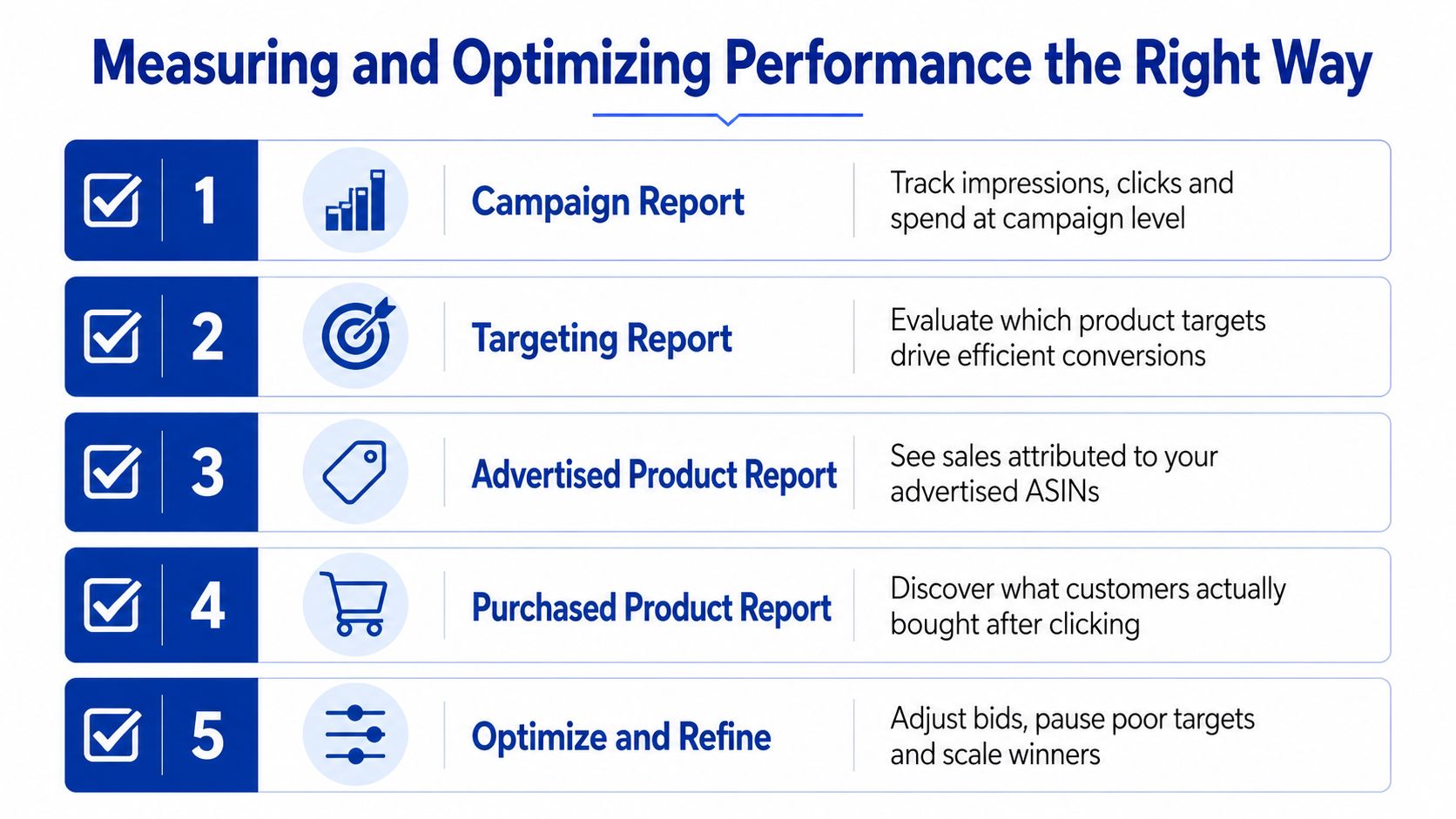
Amazon introduced downloadable reporting for Sponsored Display product-targeting campaigns on December 17, 2020. The report set includes campaign, targeting, advertised product, and purchased product reports. Amazon says these reports help advertisers see how targeted products perform over time and adjust targeting decisions. Start with Amazon's downloadable reporting update to build a repeatable review process.
Read the reports at the right level
The campaign report gives you the delivery and spend picture. The targeting report identifies expressions and product targets producing engagement and attributed outcomes. The advertised product report ties results to the ASIN you promoted. The purchased product report shows what shoppers bought after clicking.
Promoted SKU sales are only one part of the analysis. Amazon's reporting tracks attributed orders within 7 days of a click for promoted SKU sales, so separate promoted sales from total sales before judging business impact. Amazon's targeting report documentation outlines the attribution context and reporting constraints that should govern your workflow.
Targeting reports are available for campaigns with at least 1 impression. The Sponsored Products targeting report uses a 90-day lookback window, while the Sponsored Display API targeting report has a 31-day maximum date range, according to the same Amazon support documentation. Use short windows for active optimization. Waiting for a large historical export can leave you optimizing against conditions that no longer exist.
Measure lift beyond ACOS
ACOS can hide the difference between efficient demand capture and genuine account growth. Amazon Ads reported that brands using Sponsored Display product targeting for the first time saw, on average, 33.9% more impressions, 3.6% more detail-page views, and 2.6% more new-to-brand customers the following month. Brands launching a first Sponsored Display product-targeting campaign also saw 28.8% more total sales, 4.2% more detail-page views, and 2.6% more new-to-brand customers the next month compared with brands that did not adopt it. Amazon's performance research provides the benchmarks and supports a cohort-based comparison.
Apply that approach to your own account. Establish a baseline cohort, launch the campaign, then compare month-over-month changes in impressions, detail-page views, new-to-brand customers, and total sales. Amazon reported the strongest gains when Sponsored Display was added to Sponsored Products or to Sponsored Products plus Sponsored Brands, with total sales increases of 10% to 29% in those combinations. Product targeting should add reach and sales to the PPC mix, not take credit from search campaigns.
Optimization should answer one question: did this target create incremental commercial value, or did it simply claim credit for demand you already owned?
Run a weekly decision loop
Use a consistent review that ties each target to profit and organic momentum:
- Check delivery: Review impressions, clicks, spend, and activity levels before interpreting performance.
- Separate outcomes: Examine promoted SKU sales, total sales, purchased products, and new-to-brand customers independently.
- Prune waste: Pause or exclude targets that spend without credible conversion evidence or a clear defensive role.
- Refresh bids: Raise bids where incremental outcomes justify more reach, and reduce bids where traffic produces no commercial value.
- Protect learning: Avoid aggressive changes based on immature or low-impression data.
- Compare cohorts: Check whether the campaign improves detail-page engagement and total sales beyond the advertised SKU.
For recurring reviews across several brands, structured playbooks for solopreneurs can organize the process, although larger Amazon programs need account-specific rules. For display-assisted behavior, separate click-based outcomes from exposure-based influence and use Headline's view-through conversion guidance when evaluating view-through conversions.
A target earns more budget when it produces incremental sales, useful new-to-brand reach, or stronger product-page momentum. If it only inflates attributed revenue, cut it.
Your Next Move to Turn Product Targeting Into Organic Momentum
把 Sponsored Display product targeting 當成永久 ASIN 清單,會讓預算失去方向。目標清單必須隨產品角色、競爭情境,以及 Amazon 自動化已帶來的增量觸及而調整。
在以下情況,保留手動 ASIN targeting:
- 防守高價值商品詳情頁。
- 以明確的價格、品牌、評價或 Prime 優勢攔截指定競品。
- 把互補產品放在高度相關的購買情境旁。
- 控制一個轉換品質受產品條件明顯影響的細分受眾。
- 保護新品、庫存位置或優先產品,避免直接替代。
需要在相關頁面拓展探索時,再使用 contextual 或 automatic coverage。前提是先設好排除條件、分開預算,並確保報表能區分不同流量來源。Amazon 已把 Conversion campaigns 推向 contextual targeting 和 automatic targeting,因此手動清單應該變得更小、更有目的,也更容易評估,而不是為了保有控制感而持續擴大。
手動 ASIN targeting 仍然有一個明確優勢:你能指定競品、互補品和防守頁面,直接觀察每個位置是否帶來增量。自動擴展適合找新機會,但不能取代對高價值頁面的精準控制。兩者應分開設定,否則自動流量可能掩蓋手動目標的真實獲利能力。
最有效的帳戶結構會把 Sponsored Display、Sponsored Products 和 Sponsored Brands 放在同一個成長計畫中。Sponsored Products 捕捉主動搜尋需求,Sponsored Brands 建立品牌考慮,Sponsored Display 則防守商品頁並延伸 contextual reach。Amazon 的研究顯示,將 Sponsored Display 加入既有 Sponsored Products,或 Sponsored Products 加 Sponsored Brands 的投放計畫後,總銷售額可增加 10% 至 29%。That research 應該用於規劃,不只是放在報表裡。
Headline 的 organic-growth POV 是最後的判斷標準。PPC 應該帶來合格流量、改善商品考慮度、取得 new-to-brand shoppers,並累積能支持自然曝光的銷售動能。不要擴大只增加曝光卻沒有商業價值的流量,也不要只因 ACOS 偏高,就砍掉能證明帶來增量觸及和未來需求的活動。
先分開 defensive targets、conquesting targets 和 exploratory automation,為每類設定獨立預算與成功指標。接著檢查 total sales、detail-page views、new-to-brand customers、purchased products,以及 organic movement。若團隊無法穩定連結這些結果,找能同時管理投放操作與整體成長系統的操作者。
Headline Marketing Agency 管理 contextual product targeting 和 category targeting,重點放在獲利能力、organic ranking 與可持續擴張。前往 Headline Marketing Agency 了解如何把 product-targeting campaigns 連接至更完整的 Amazon PPC 和 DSP growth plan。
Get Your Free Amazon PPC Audit
Discover untapped growth opportunities and see how our data-driven approach can improve your ROAS.
Get Free Audit →Wollen Sie Ihre Amazon PPC-Performance aufs nächste Level bringen?
Lassen Sie Ihre Amazon PPC-Kampagnen professionell analysieren und entdecken Sie neue Wachstumsmöglichkeiten.